
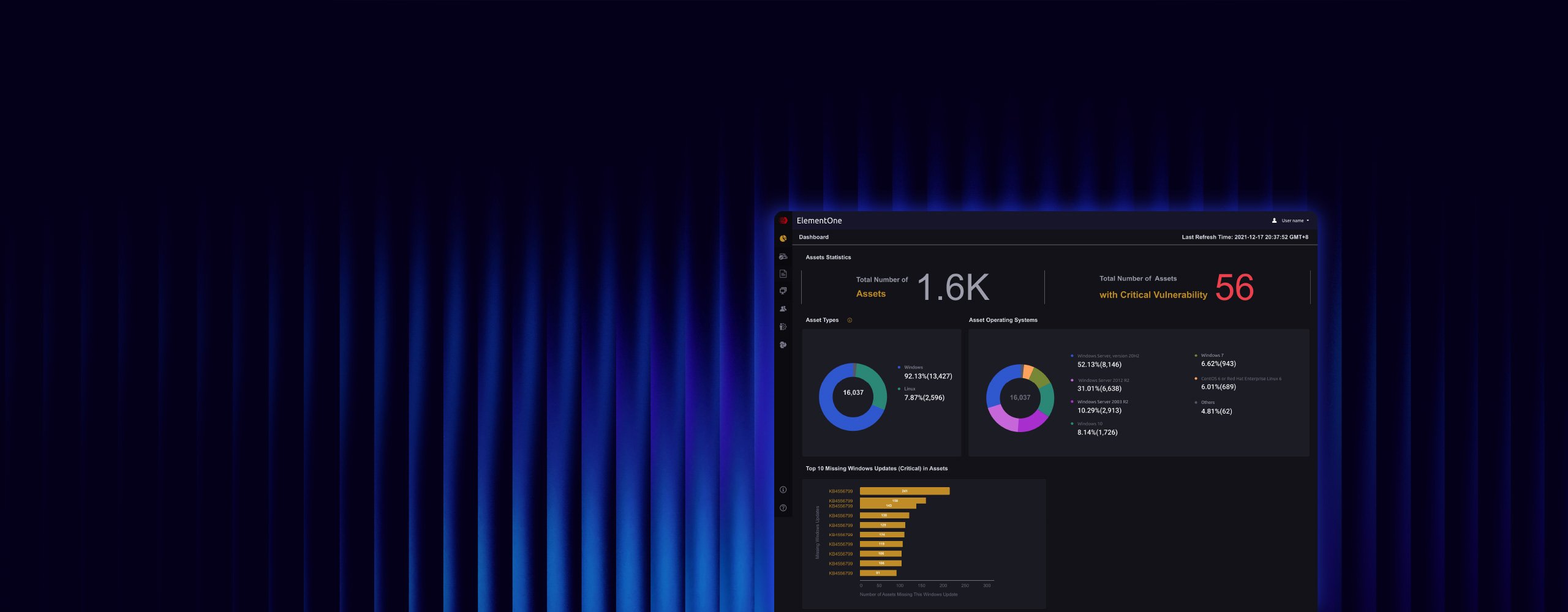
One Console for Your Entire Inspection Fleet
Centralized management for 1K+ inspection devices across every facility.
Centralized management console for your entire Portable Inspector and Safe Port fleet. One dashboard for data scanning, device health, and compliance reporting.
Inspection devices deployed across facilities generate valuable data, but only if you can see it all in one place.
ElementOne aggregates scan results, asset inventories, and threat detections from 1,000+ Portable Inspector and Safe Port devices into a unified security posture dashboard. Automate pattern file distribution to keep every device current. Generate audit-ready reports for IEC 62443, NERC CIP, and FDA compliance with a single click. Group-based device management ensures consistent security policies across every facility without updating devices individually.
From Scattered Devices to Coordinated Protection
One Portable Inspector scans a legacy controller. Another verifies a contractor's laptop. A Safe Port screens USB drives at the plant entrance. Valuable security work, all generating data nobody sees together. ElementOne connects these activities. Fleet-wide scan results feed one dashboard. Pattern files push to every device automatically. Compliance reports generate with a single click. Your inspection program stops being a collection of devices and becomes a coordinated security operation.
Inspection Campaign Orchestration
Plan, execute, and track security inspection campaigns across all facilities from a single console.
Centralized Scan Intelligence
Aggregate and analyze inspection data from every Portable Inspector and Safe Port in your organization.
Automated Compliance Tracking
Generate audit-ready reports for IEC 62443, NERC CIP, and FDA requirements with a single click.
OT Security Challenges
Critical challenges that ElementOne is purpose-built to solve
01 / 03
Inspection Data Trapped in Isolation
Portable Inspectors and Safe Port stations deployed across multiple facilities generate scan results in isolation. Without centralized visibility, a threat pattern emerging across three sites goes undetected because nobody sees the data together.
Inspection Data Trapped in Isolation
Portable Inspectors and Safe Port stations deployed across multiple facilities generate scan results in isolation. Without centralized visibility, a threat pattern emerging across three sites goes undetected because nobody sees the data together.
Key Features
Discover how ElementOne protects your OT environment
01 / 04
Centralized Asset & Risk Visibility
Monitor your entire inspection environment in a single view. Asset type visualization, scan statistics, vulnerability highlights, and top missing patches. Know exactly where to focus remediation efforts across every facility you manage.
Key Capabilities
Centralized Asset & Risk Visibility
Monitor your entire inspection environment in a single view. Asset type visualization, scan statistics, vulnerability highlights, and top missing patches. Know exactly where to focus remediation efforts across every facility you manage.
Key Capabilities
Real-World Applications
See how organizations deploy ElementOne in production environments
01 / 04
Multi-Facility Fleet Management
Organizations with hundreds of Portable Inspectors across multiple locations gain centralized management ensuring consistent security policies and current malware patterns across every device. 100% pattern compliance across distributed fleet.
Multi-Facility Fleet Management
Organizations with hundreds of Portable Inspectors across multiple locations gain centralized management ensuring consistent security policies and current malware patterns across every device. 100% pattern compliance across distributed fleet.
Deployment Options
Choose the right deployment model for ElementOne
On-Premises Virtual Appliance
Deploy ElementOne as a virtual machine for centralized management of all security inspection devices.
Technology
Technologies powering ElementOne
Inspection Orchestration
Campaign-Based Security Scanning
ElementOne enables security teams to define inspection campaigns with specific scan profiles, target devices, and compliance criteria. Results are automatically aggregated and compared against baselines.
- Campaign definition and scheduling
- Scan profile management
- Baseline comparison
- Automated reporting
Coordinate security inspections across entire facilities from a single console.
Deploy ElementOne in 4 Steps
A streamlined implementation process designed for OT environments with zero disruption to operations.
Week 1: Deploy ElementOne virtual appliance
Week 2: Connect existing Portable Inspector and Safe Port devices
Month 1: Configure compliance reporting and pattern distribution
Ongoing: Expand with Sennin for complete TXOne orchestration
Operational & Protected
Technical Specifications
Seamless Integration with ElementOne
Designed to integrate into existing OT infrastructure without disrupting operations.
Customer Success

“Within this context, TXOne Networks emerged as the ideal technology partner, capable of responding precisely to Ansaldo Energia’s requirements.”

“Thanks to OT security solution Stellar, TXOne Networks helps us mitigate risks that we couldn't address yesterday without making significant financial investments.”
Related Resources
Explore resources related to ElementOne
How Terna Strengthened OT Resilience with TXOne Networks’ Portable Inspector Pro
Terna, Europe’s largest independent electricity transmission operator and Italy’s sole TSO, is responsible for maintaining the National Transmission Grid and ensuring uninterrupted power delivery across the country. In a landscape increasingly influenced by geopolitical dynamics and interconnected European power systems, cybersecurity has become essential to operational continuity. With cyber and OT security now a strategic… Read more
Safe Port Datasheet
Safe Port is a ruggedized touchscreen scanning station that removes malware from external media in under a minute before it enters the OT environment. Designed for plant operators, not security specialists.Keywords: portable inspector, agentless malware scanning, OT asset inventory, air-gapped security, USB malware scanner, legacy system security, OT endpoint security, third-party vendor access controlpdfSafe Port is an all-in-one cybersecurity solution designed to secure industrial and operational technology environments against increasing external threats without disrupting plant operations. The easy-to-use touchscreen device quickly removes malware from untrusted, third-party, and contractor removable media using accurate, high-speed anti-malware scanning capabilities and secure file transfer functionality. Safe Port also centralizes audit log collection from TXOne Portable Inspectors, enabling streamlined auditing workflows. Plant operators can complete security and device audit processes without specific expertise, reducing reliance on large, on-site security teams. By simplifying external media scanning and centralizing device audit management with Element One, Safe Port makes preventative and routine security initiatives achievable without adding operational overheads.Download the datasheet to view Safe Port key features, specifications, and benefits.^should we change?Show moreSame issue as ElementOne — it's the datasheet's own intro copy pasted in, and it ends with an instruction. It's functional but inconsistent with everything else we've written. Worth rewriting. The distinct frame for Safe Port: it's a physical scanning station that sits at the entry point of the OT environment — the moment external media arrives on site. It's less about the technology and more about making a security process that normally requires expertise something any operator can do. Agree?yes, that's right.Safe Port is a ruggedized touchscreen scanning station that sits at the entry point of the OT environment, scanning external media before it makes contact with production assets. Designed for plant operators rather than security specialists, it removes malware from USB devices in under a minute without requiring cybersecurity expertise to operate. Beyond media scanning, Safe Port centralizes audit log collection from TXOne Portable Inspectors, feeding data into ElementOne for streamlined visibility and reporting. What would otherwise require dedicated security staff and manual processes becomes a routine part of how anyone entering the facility handles external devices.great! blurb?Safe Port is a ruggedized touchscreen scanning station that removes malware from external media in under a minute before it enters the OT environment. Designed for plant operators, not security specialists.
See All Resources
Browse all resources related to elementone
Ready to Centralize Your Inspection Fleet?
See how ElementOne manages 1K+ inspection devices, automates pattern distribution, and generates compliance reports from a single console.